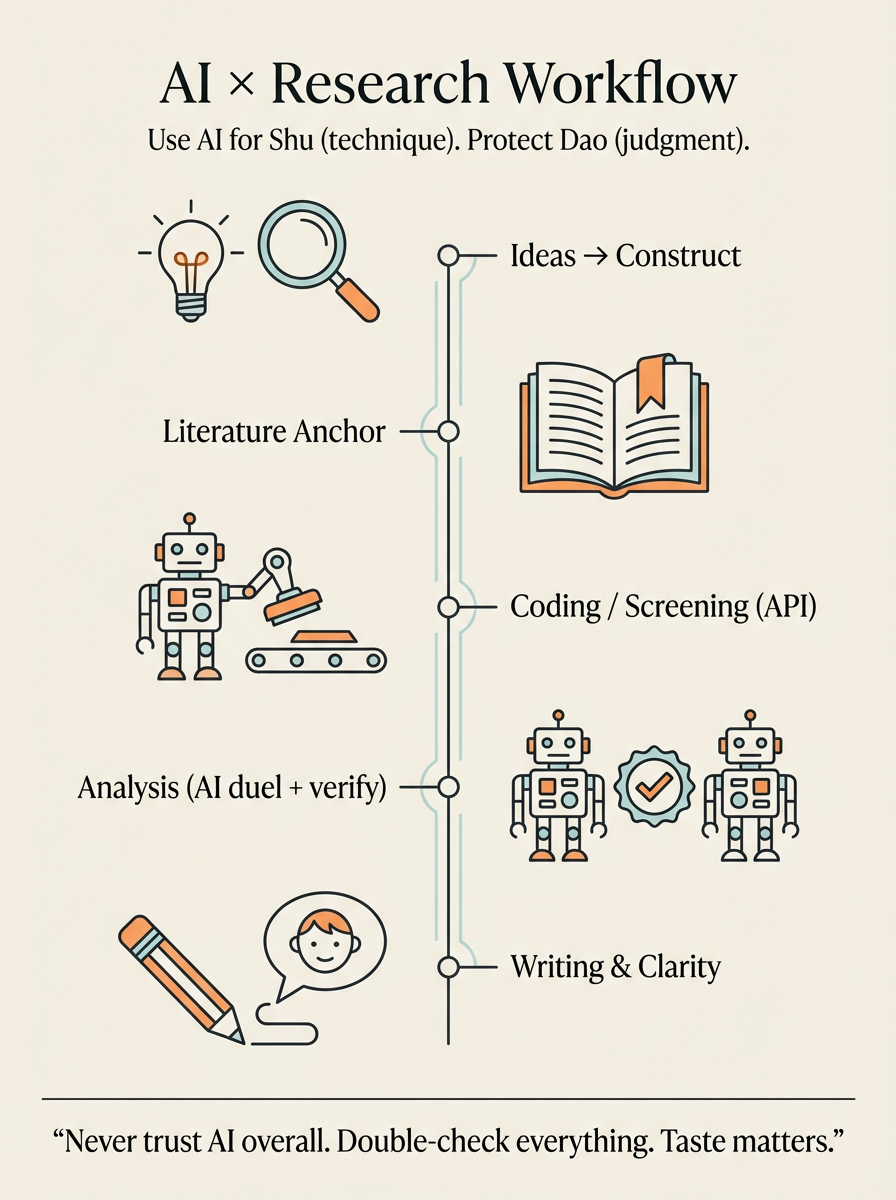
I want to summarize how AI helps in my research workflow—what it's good for, what's bad at, and how I keep myself from getting "smoothly misled."
AI is helpful, but it is not a judge.
Never trust AI overall.
Use it, argue with it, learn from it—but final judgment is still on you.
Why? Because AI often sounds confident even when it's wrong. And it has a very specific failure mode: it can define things literally, based on surface words, while in our field the same word might mean something very different. So you always need human grounding.
With that said—AI is still extremely useful, and I use it across the whole research pipeline.
1) Come up with ideas: from life observation → construct
This is where everything starts.
We often have observations from life. We feel something is happening. But we're not sure how to narrow it down into a construct. At that point, I can discuss with GPT. I mainly start from my feelings and intuitions, and then I go read the literature.
Here is the key problem: AI sometimes defines a variable from the literal meaning, but the variable itself is not actually that meaning in the field. The concept is not really that.
So the most important thing here is: humans still have to check the literature.
But AI is still useful because I can tell it the things that are "hard to articulate," and I can analyze them with it.
And honestly, the most common scenario for me is:
AI says something, and I feel it is definitely wrong—but I can't immediately explain why it's wrong, and it also can't explain itself clearly. Then I start thinking: okay, where exactly is the problem?
That moment is powerful. That's when I find the blind spot. I get closer and closer to the real answer.
So yes—sometimes it's literally my brain fighting with its brain.
And that's why never trust AI overall is so important.
2) After I have an idea: measurement → tools → coding / screening
Once I have an idea, and I know how to measure it, and I've found the tools, the next step is often "coder work":
coding, encoding, annotation, screening.
This is one place where AI can scale.
If you prompt AI to code, it can repeatedly do a lot of items, very fast. But I strongly prefer doing it through an API setup, because I want to reduce "context carryover" across items. I want each case to be independent, not context-aware across the batch.
It's convenient, but it still needs humans. The biggest issue is still the same:
AI is a black box.
So I treat AI coding as a tool for throughput, not for truth. Truth still needs validation: samples checked by humans, consistency checks, and clear rules for uncertainty.
3) Data cleaning and data analysis: AI is a helper, not a replacement
Later, there's data cleaning and data analysis.
I definitely don't think we can let AI do analysis completely. But when I'm unsure about a method, I do discuss with AI and learn from it. It can explain options, assumptions, and how people usually do things.
My favorite trick here: "AI duel"
I call it "AI duel"—two AIs fighting.
When I really don't understand something, I let GPT answer first, then I ask Gemini or another model to answer the same question. Then I compare.
The point is not "who wins." The point is: their disagreement shows me where the real uncertainty is. It helps me narrow the answer space. Then I use more precise wording to find more precise sources, and I go to the actual primary source to confirm.
This is really important because:
Double check is the most important thing in the whole workflow.
We cannot fully trust AI. It's not "aware." It doesn't have real context. Context is what we provide, and our language is also compressed. So the safest workflow is always: AI helps you narrow → you verify with real sources.
Search AI is useful, but still not enough
Sometimes I also use search-oriented AI tools (like Perplexity) to find papers and see how similar work analyzed things. It can be good for finding new stuff.
But some cutting-edge work still won't show up. If you roughly know who the key people are in the area, you still have to click into their personal pages and check their newest papers, to avoid missing things.
4) Coding vs understanding: my rule for writing code
AI can write code. But if you don't understand what it wrote, that's the biggest problem. You can't judge if it's correct. You can't debug it. You can't trust the result.
So when I code, I try not to rely on AI as my default. I use it mainly when:
- I hit an error and I truly don't know what's wrong
- I need a quick scaffold and I will inspect everything
- I need help interpreting an error message
In short: AI can assist, but analysis still has to be my analysis.
5) When results come out: interpretation and storytelling is still on me
When results come out, interpretation is a complex process.
First I need to know where the key point is.
Then where the contradiction is.
Then only after that can I write the story—find the most reasonable storytelling point.
Storytelling is still mostly on me: reading literature, thinking, connecting.
But sometimes I use AI in a very specific way: I ask it to help find news, or scan current events, to see whether my work connects to something happening in the world. If it connects, writing from a news angle can bring more attention.
I treat AI like a full-text search machine here.
But judgment is still mine. Always.
6) Writing as a non-native speaker: AI helps a lot, but big words are a trap
I'm not a native speaker, and academic writing is very template-like and structured. Once you know what good writing looks like, you can write a draft, then let AI revise/add.
Then you will see the gaps. Then you can push it with follow-up questions.
But you still need to have the knowledge yourself—otherwise you can't tell if the revision is correct or just "sounds nice."
One extra thing I actively use AI for: "six-year-old clarity"
AI often uses big words and makes things complicated. That's one of the biggest writing problems with AI: it inflates language.
So I often do an interactive loop like:
"Explain this so a six-year-old can understand."
Not because my paper is for six-year-olds, but because if I cannot make it simple, I probably don't understand it deeply enough. Making things simple takes discipline and interaction. I keep pushing it: fewer abstractions, more concrete language, clearer logic.
This is actually one of the best uses of AI in writing—forcing clarity.
7) Taste matters: AI gives you the "average," scientists are not average
I think the biggest problem of AI is that it doesn't really "think." So good taste is extremely important.
Taste matters because AI mostly integrates everyone's ideas. And right now, I don't think it has enough high-quality data + selection ability to reliably generate truly new, deep synthesis. Otherwise it produces something like the human average.
And scientists are not average humans.
In my view, AI learns like a normal distribution: pulled toward the middle value. It can be very smooth, very coherent, very "reasonable"—but not necessarily mind-blowing.
So I tell myself:
Cherish your own thinking.
Let AI do at most wording edits.
If it gives a point that genuinely surprises you, record it—but keep your own core viewpoint book. Don't learn everything from AI.
Personally, I learn a lot more from specific people: podcasts, essays, and scholars I trust—because that's where sharp taste and real intellectual style live.
Also, AI often "reduces the dimension." It compresses details. It collects, rewrites, translates—there are many places where errors can happen. That's why we need to be cautious.
8) Add-on: Gemini "Nano Banana" for scientific figures (flowcharts)
One more very practical trick: I also use Gemini + Nano Banana for research figures, especially flowcharts and pipeline diagrams.
It's not for data plots—if it's data, you should plot with real data and real code. But for process diagrams, the layout is honestly better than humans most of the time.
The only annoying part is sometimes you need to adjust the font size. But overall the aesthetics are very good. You can edit the text, and the text accuracy is surprisingly high.
I recommend basically every researcher try it at least once—especially if you hate spending three hours nudging boxes in PowerPoint like you're doing digital pottery.
9) The conclusion: a Chinese lens—Dao (道) and Shu (术)
In Chinese, we often talk about two layers: Dao (道) and Shu (术).
- Shu (术) is technique: methods, execution, procedures, tools.
On the Shu side, AI can do things extremely well. - Dao (道) is the deeper way: your observation, your dialogue with yourself, your worldview, how you connect points into meaning, how you decide what matters.
On the Dao side, AI cannot do it—at least in my experience. I've tried to make it connect many points into a deep framework, and I haven't been able to truly get that.
If someone finds a prompt that can do that reliably, I suspect they are feeding it very high-quality data and very strong guidance, so it learns what "better" looks like. Because often "better" in academia is not the average—it's the outlier insight.
So my final take is:
AI enhances humans mainly on Shu.
Dao is still on you.
Use AI to speed up the procedural parts, so you can protect the deep parts. Double check everything. Keep your taste sharp. And don't outsource your judgment—because that's literally your job as a scientist.

Xianglu TANG
Researcher at Stanford HAI & Columbia Business School